 Now that you’ve done some exploring around this website and understand how this program will work, it’s time to set up your very own personal blog to begin recording your thoughts, discoveries and exercises. For this program, we recommend that you use Blogger*, a popular free online blog hosting service that is extremely easy to use.
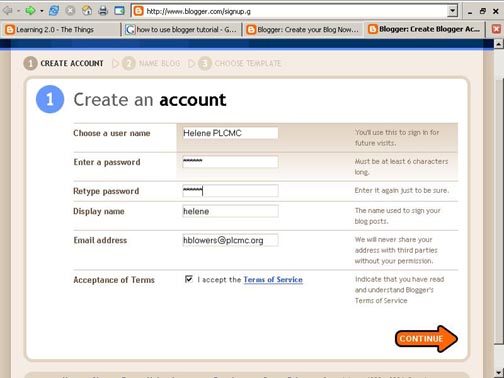
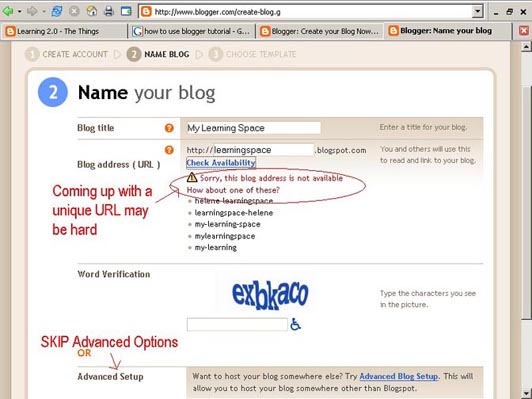
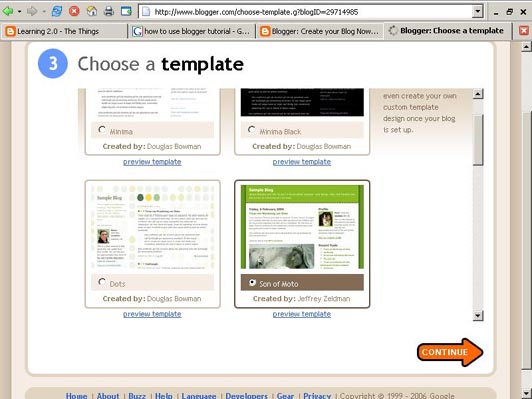
Creating a blog using Blogger takes just three steps:
- Create an account (view screenshot)
- Name your blog (view screenshot)
- Select your template. (view screenshot)
- To add posts and edit: You can add posts, edit or change the step-up (including template) of your blog by going to http://www.blogger.com and logging in. Be sure to write down your login and password so you'll remember.
- To view your blog: Your blog address is http://(xxxx).blogspot.com, (xxxx)=the unique identifier you entered in Step 2. Be sure to also write down your blog address.
- Freevlog’s Quicktime Tutorial: Setup a Free Blogger Blog Note: Ignore the opening comments about downloading Firefox if your PC doesn’t have it. This will work in Explorer and Netscape just fine.
- Blogger’s Quick Tutorial
OK -- Now, it’s your turn...
Discovery Exercise:
- Setup a blog for yourself through Blogger*
- Add a test post or two.
Note: Use one of your test posts to create an entry about the habits among the 7 and 1/2 lifelong learning habits that is easiest and hardest for you & why. - Create a discovery post for each of the ’23 Things.’Please clearly label each entry in your blog by titling each post with the week and thing to which it refers. For example: Week 1, Thing 1: About This Program, Week 1, Thing 2: Pointers from Lifelong Learners. Each of your posts should provide insights into what you’ve discovered and learned. Feel free to share what worked for you … and what didn’t … what surprised you … what frustrated you … what amazed you.
* Use of Blogger is only a recommendation. If there is another blog hosting site that you are more comfortable with, please feel free to use it.